Key takeaways
- When partners run different CRMs, the same deal lives in several systems and people keep them in step by hand.
- Connectors move fields. They do not decide which record is right, how accounts match or who may see what. Settle those first.
- One REST API in the middle, with access scoped to each partner, lets every company keep the CRM it already uses.
A manufacturer runs Salesforce. The rep firm that sells its products runs a different CRM. A distributor is on Microsoft Dynamics 365, a newly acquired business unit is on HubSpot, and the numbers that matter most (commission statements, price files, order history) sit in an ERP and a folder of spreadsheets.
The same opportunity now exists in three or four places, and no two of them agree. Someone keeps them in step by hand, usually late, and each company forecasts from its own version of the deal.
Why CRM sync is harder than it looks
- Each CRM models a deal differentlyStages, owners, product lines and required fields do not line up. One system's stage is another's status plus a probability.
- The same customer has several namesWithout a shared ID, "Acme Controls" and "ACME Controls, Inc." become two accounts, and every sync adds duplicates.
- Two-way sync creates conflictsWhen both sides can edit, an update can overwrite a newer one, or bounce between the systems without end.
- Partners must not see everythingA rep firm sells for many manufacturers. Each one may see the deals for its own products and nothing else.
- Private data has no connectorCommission files, ERP orders and spreadsheets hold the actual sales, and none of them arrives through a marketplace plug-in.
Moving to a modern CRM without starting over
This pain is often what prompts a CRM replacement, and a new CRM does help. The current platforms, Salesforce, Dynamics 365 and HubSpot among them, expose their data through documented APIs, so records are reachable in a way they were not in older, closed systems. But a migration only fixes the picture inside your own walls. Your partners will keep the CRM they have.
So treat the move as an integration project, not only a software purchase. Five decisions matter more than the choice of product, and they are best made before any data moves.
| Decision | What to settle |
|---|---|
| System of record | Which system owns each field. One owner per field ends most conflicts. |
| Shared key | One ID carried on the record in every system, so an update lands on the existing record and never creates a second one. |
| Scope | Which records and fields each partner may read, and which they may change. |
| Direction and timing | What flows each way, how often, and only what has changed since the last sync. |
| History | Every change kept with who made it and when, so a disputed number can be traced. |
Connect through one API, not one connector per pair
The usual first attempt is point to point: a connector from your CRM to each partner's CRM. Every pair is its own project with its own mapping, the count grows with each partner, and a partner changing CRM means starting again.
The alternative is one API in the middle. Your system publishes a single, stable description of an opportunity, a company and a contact. Each partner connects once, with its own credentials, and maps that description to its own CRM. Adding a partner means issuing a key, not building a connector, and the rules about scope, permissions and history live in one place.
How we build it: REST, JSON, Slim and Postman
We build these as REST APIs, the same way each time. This method is what we bring to a new project.
- REST over HTTPSPlain web requests, each carrying the partner's key. Salesforce, Dynamics 365, HubSpot, an integration tool or a private system can all make them, with no vendor-specific connector.
- JSON in and outOne predictable format for opportunities, companies and contacts, which every current CRM and integration tool can read and write.
- Slim PHP frameworkA small framework for routing and middleware, and little else. The key check, the partner's scope and the request log are written once and applied to every endpoint, so a new endpoint is quick to add and deploy.
- Postman to validate endpointsEvery endpoint is tested in Postman before a partner connects: the request, the response, the error cases and the permission limits.
The approach on a client build
JD Martin, a manufacturer's rep firm, works every opportunity in Visie iQ, a custom CRM we built for its sales team, across many manufacturers and several operating companies. Each manufacturer runs its own CRM. Both sides needed the same pipeline without re-keying it, and each manufacturer could be shown only the deals for its own products. We added an API to that CRM, the Visie iQ API, built as described above (case study). Visie iQ is that client's own system, not a product for sale. What carries over to another business is the approach.
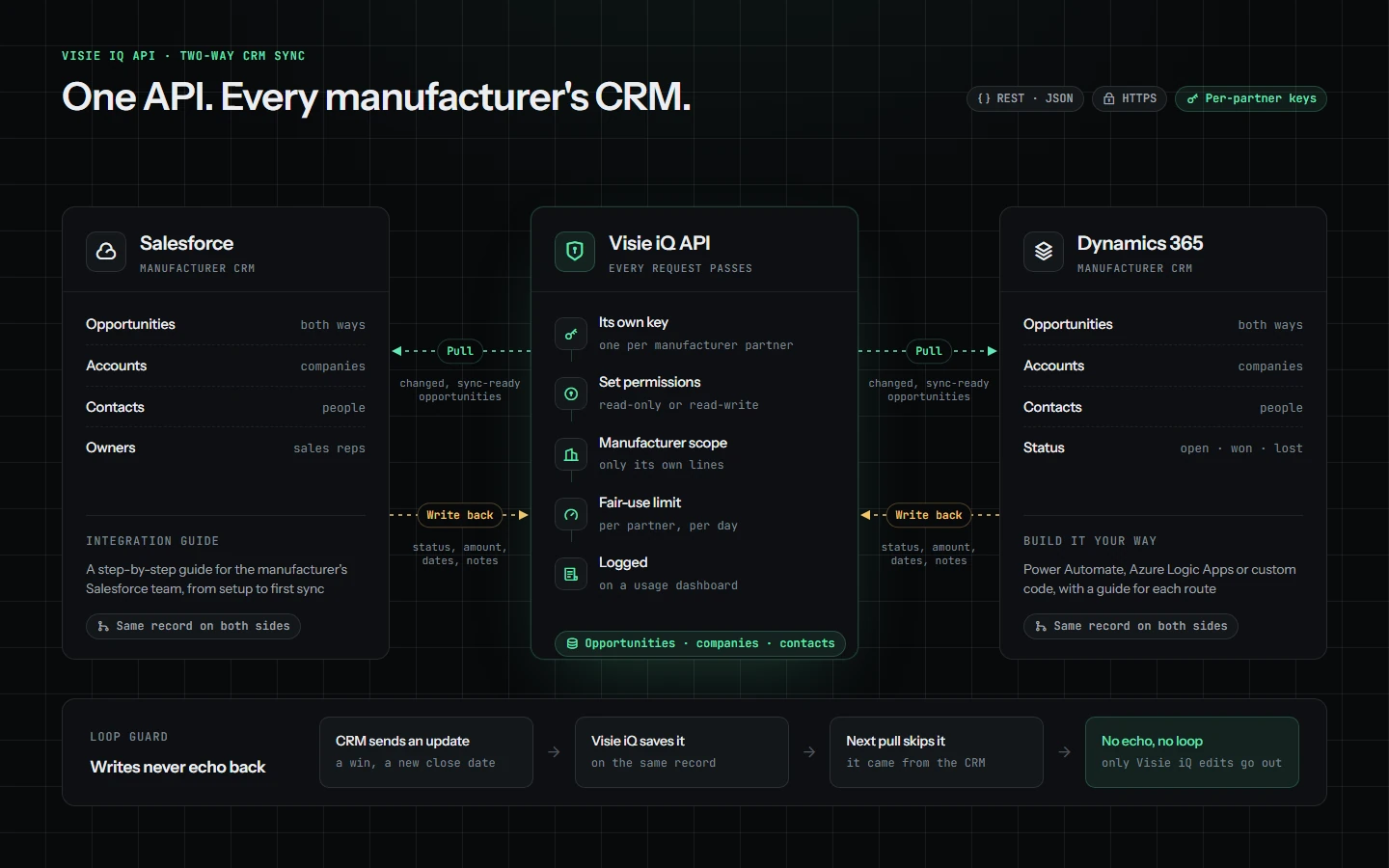
- Each partner gets its own keyAccess is read-only or read-write, limited to that manufacturer's own lines, and every request is logged.
- The partner's CRM pulls what changedOpportunities updated in the rep firm's CRM arrive on the matching record in Salesforce or Dynamics 365.
- Updates are written backA win, a new amount or a revised close date entered in the manufacturer's CRM returns to the same record.
- Nothing echoesA change that came from a CRM is not sent back to it, so the two systems never loop.
Integration guides were written for Salesforce and Dynamics 365, so a manufacturer's own team can connect without a support call. Because the API is plain REST and JSON, nothing in it is specific to either CRM.
The challenges it solved
- Double entryAn opportunity logged by a rep appears in the manufacturer's CRM without anyone re-typing it.
- Conflicting versionsBoth companies see the same stage, amount and date, because it is one record with two views.
- Partner visibilityEach manufacturer reaches only its own lines, under its own key.
- Forced tool changesEach company keeps the CRM it already uses. Nobody logs in to a partner's system or buys seats in it.
- Separate pipelinesThe rep firm's operating companies work from one platform, not one pipeline each.
To start on your own systems, pick one record type, usually opportunities, and one partner. Make the five decisions, connect, and see how much re-keying disappears before adding the next partner. The same discipline about scope applies when AI enters the picture, which we cover in AI data governance: what to do when your team uses personal AI accounts.
Running the same pipeline in more than one CRM? LekkerLogic designs and builds REST APIs and integrations, with the method described here, to keep your systems and your business partners in step.
Start a conversationVisie iQ was built for a client and is not a product for sale. Salesforce, Microsoft Dynamics 365 and HubSpot are named as examples. LekkerLogic is not affiliated with them.